

Blog

Introducing Cost Recovery

Discover how Cost Recovery Reports can help you understand, allocate, and share capture-related costs for both internal workflows and external billing needs.

Last Updated February 2026

Cost Recovery Reports provide a new way to understand, allocate, and share capture-related costs—supporting both internal workflows and external billing needs.
These reports are designed to work whether you:

  • Allocate capture costs internally by matter or project
  • Share capture-level costs externally as part of a billing workflow
  • Want a more detailed, capture-level view of usage across your account

In addition to enabling cost recovery workflows, this release introduces a new By Capture report type, giving teams deeper visibility into how individual captures contribute to overall usage and cost.

What are Cost Recovery Reports?

Cost Recovery Reports are downloadable, billing-oriented reports that calculate usage and cost at the capture level. Reports can be generated monthly or on demand and are designed to be clear, consistent, and reusable.

They help you:

  • Understand how usage is calculated across different capture types
  • Allocate costs to specific matters, projects, and folders
  • Support both internal analysis and external billing workflows


How Pages Are Calculated

To ensure consistency across capture types, usage is normalized into pages using the following rules:

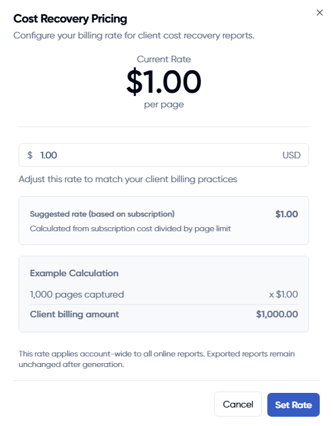
  • Web captures: Counted by the number of pages in the final generated PDFCost Recovery Pricing Window
  • File captures (e.g., documents, images): Counted as 1 page per file
  • Videos: Counted as 10 pages per video

This approach allows all captures—regardless of type—to roll up into a single, comparable usage total.


How the Suggested Cost Per Page Is Calculated

Each Cost Recovery Report includes a suggested Cost Per Page that assumes full utilization (100%) of your subscription allotment over the course of a year.

The suggested value serves as a starting point. If your team chooses to adjust it, reports will automatically reflect the updated value.

Editable Pricing with Full History

Admins can modify the cost-per-page value used in Cost Recovery Reports. When changes are made:

  • A price history is preserved
  • You can see which admin made the change, when it occurred, and what the previous and new values were

This ensures transparency and accountability, even as pricing assumptions evolve over time.

New Report Type: By Capture

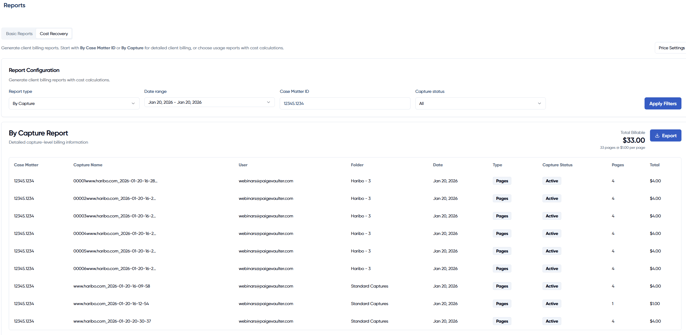
The new By Capture report provides a detailed, line-by-line breakdown of every capture in your account.

Each row includes:

  • Case / Matter
  • Capture Name
  • User
  • Folder
  • Date
  • Capture Type
  • Capture Status
  • Pages
  • Total

This report can be used on its own for internal analysis or alongside Cost Recovery Reports to support billing and reconciliation workflows.
By Capture Cost Recovery Report

Access and Permissions

Cost Recovery Reports are available under Reports and can be accessed by Admin users only.

As with other reports:

  • All reports are account-wide
  • Captures from all users in the account are included

Availability

Cost Recovery Reports will be included with select plans.

To ensure all customers can evaluate the feature, Cost Recovery Reports will be available to all accounts for a trial period through March 31, 2026.

After March 31, 2026, access will be limited to plans that include the feature. To confirm availability or discuss plan options, reach out to Support or your account manager.

Follow the Product Changelog for Live Feature Updates: